Black Hole
Throw in. Pull out. Anywhere.
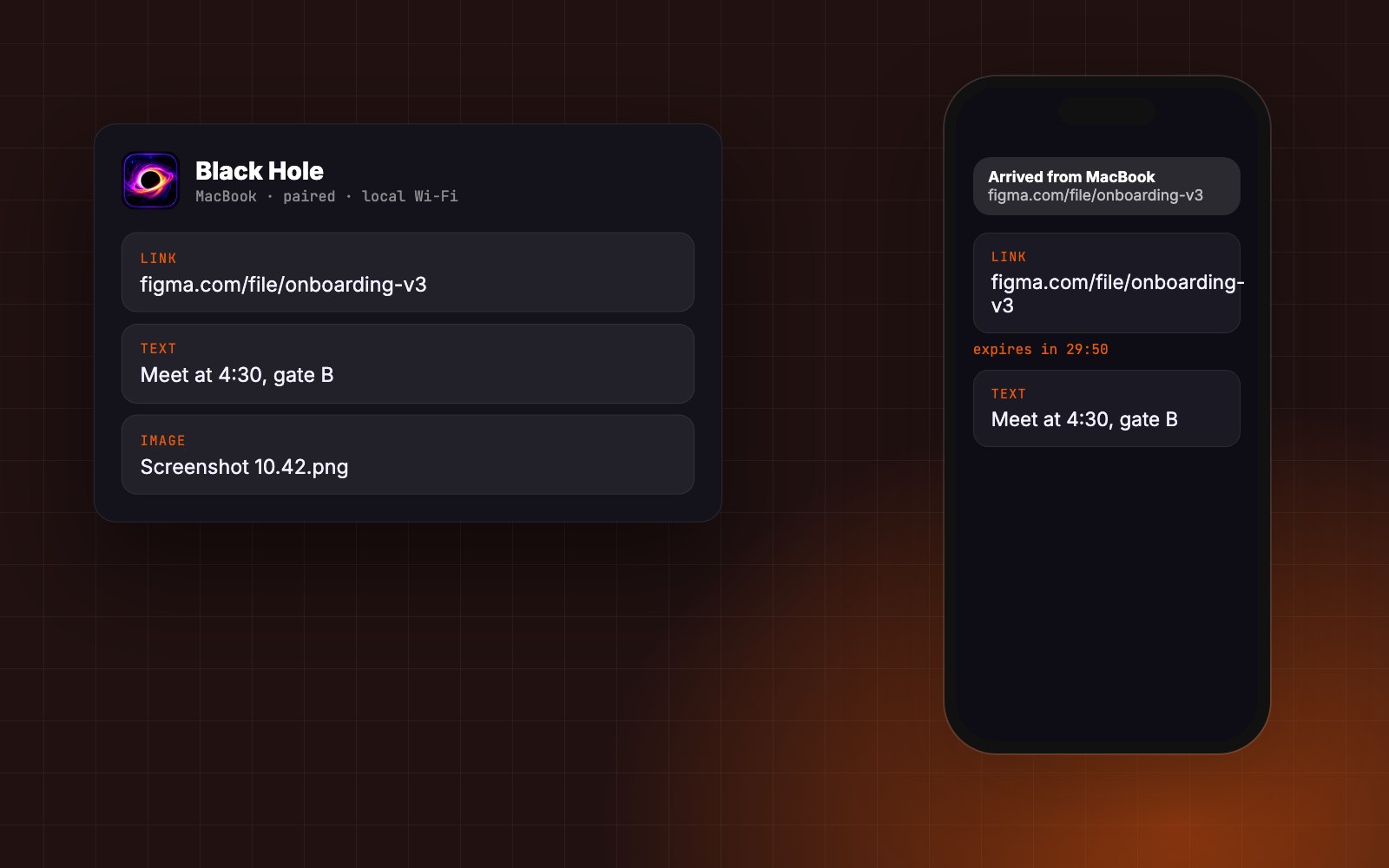
A private clipboard between your Mac and your phone. Copy on the Mac and it is on your phone a second later — over your own Wi-Fi, with no account, no relay server, and everything expiring on both devices.
Moving a link or a screenshot from laptop to phone usually means messaging yourself. Black Hole makes it automatic: copy on the Mac and it appears on the phone, no app to open first.
Devices pair once with a 6-digit code and a QR scan, then talk directly over the local network — nothing passes through a server and no third party ever sees what you copy.
Items expire after 30 minutes on both devices at once unless pinned. Text, links and images all move the same way, with notifications on both ends.
Moving a link or screenshot from laptop to phone usually means messaging yourself or using a cloud clipboard that stores everything you copy on someone else's server.
The goal was the opposite: device to device on your own network, nothing stored anywhere else, and nothing kept longer than you need it — on macOS and Android, despite Android's limits on background clipboard access.
- mDNS
- Ed25519
- 01
Create identities
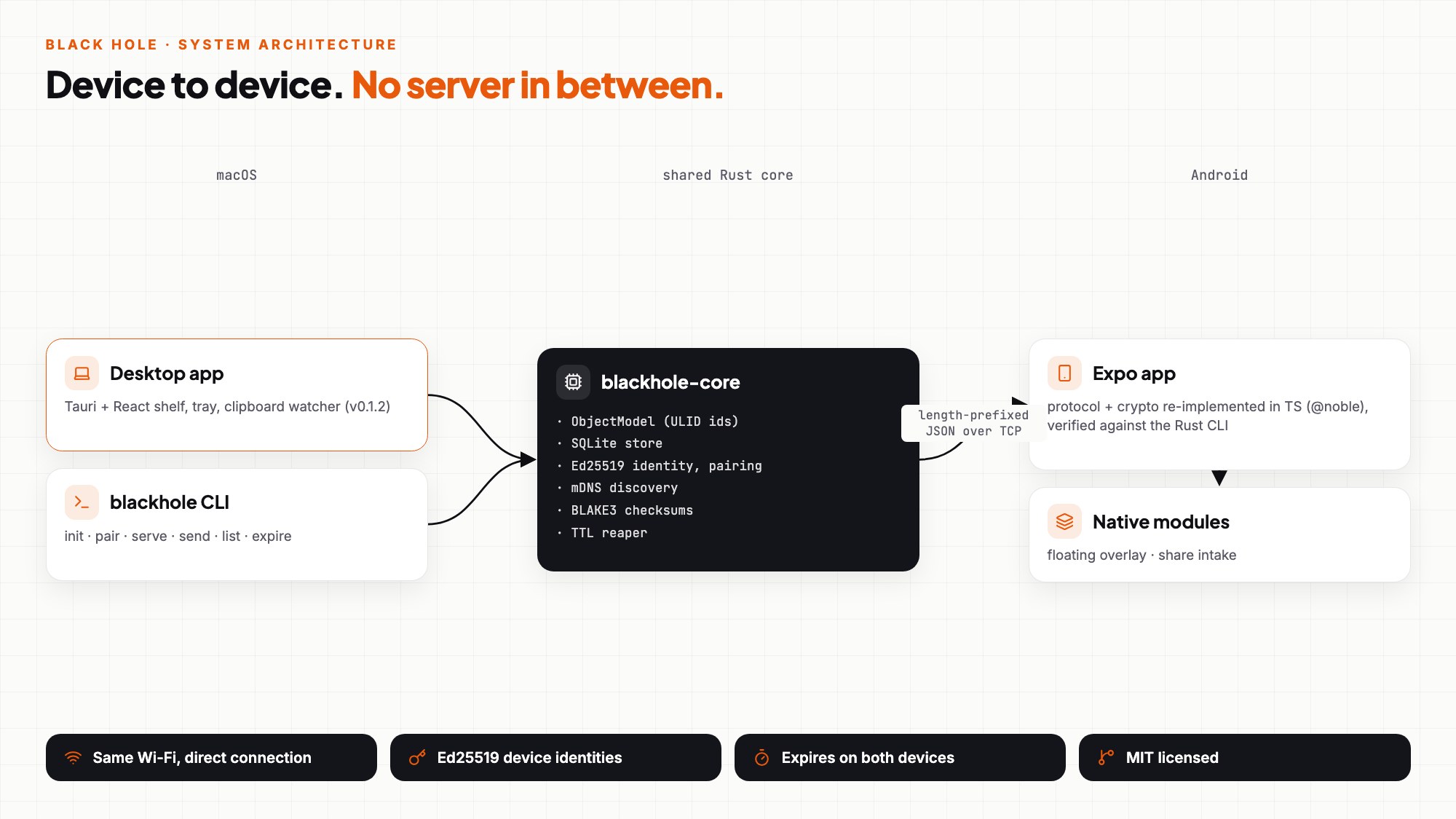
Each device generates an Ed25519 key pair; its device id is derived from a BLAKE3 hash of the public key.
- 02
Pair once
The Mac shows a 6-digit code and a QR; the phone joins with it and both remember each other as paired peers.
- 03
Discover
Paired devices find each other on the local network with mDNS — no relay or rendezvous server.
- 04
Teleport
Objects (text, link, image) travel as length-prefixed JSON frames over TCP with BLAKE3 checksums; the receiver files them on its shelf.
- 05
Expire
Every object carries an expiry (30 minutes by default); the TTL reaper clears it on both devices unless it's pinned.
No middleman
Direct device-to-device transfer on your own Wi-Fi. No account, no cloud.
Expires everywhere
A 30-minute default expiry that clears both devices at once; pin what you want to keep.
Images too
Screenshots and photos move like text, with thumbnails on the shelf.
One-time pairing
A 6-digit code and QR code on the Mac, one scan on the phone.
- 01Shared Rust core with CLI, desktop and mobile front ends
- 02Respects Android’s background-clipboard limits with a one-tap send
- 03Desktop app at v0.1.2
- 04MIT licensed
No server until it's unavoidable
Direct device-to-device transfer on the local network; any future relay is planned to only ever see opaque bytes.
One core, thin shells
Object model, store, identity, discovery and expiry live once in Rust; the Tauri app and CLI are thin layers over it.
Prove the port, don't trust it
The TypeScript protocol on Android was verified against the real Rust CLI — a real pairing handshake and a real received object over actual TCP — before it was used.
Respect the platform
Android blocks background clipboard reads, so sending from the phone is one deliberate tap instead of a hack that breaks on the next OS update.
- →iOS app on the same protocol.
- →QUIC transport and an optional relay for when devices aren't on the same network.
- →Files beyond text, links and images, with chunked resumable transfer.
Want something like this?
I can build one for you.
Tell me what you have in mind — I'll reply with questions, a plan and a quote.