Tecstellar Command Center
One console for every app we ship
A command centre for a portfolio of consumer apps: agents work call queues, supervisors manage access and escalations, and owners see users, revenue, funnels and SLA health across every app on one screen.
Lead Engineer — product, frontend & telephony
2026
Private build — demo on request
Tecstellar runs several consumer apps — RealBroks, IronDrobe and more on the way. Users, payments, tickets and follow-ups were spread across separate dashboards, one per app.
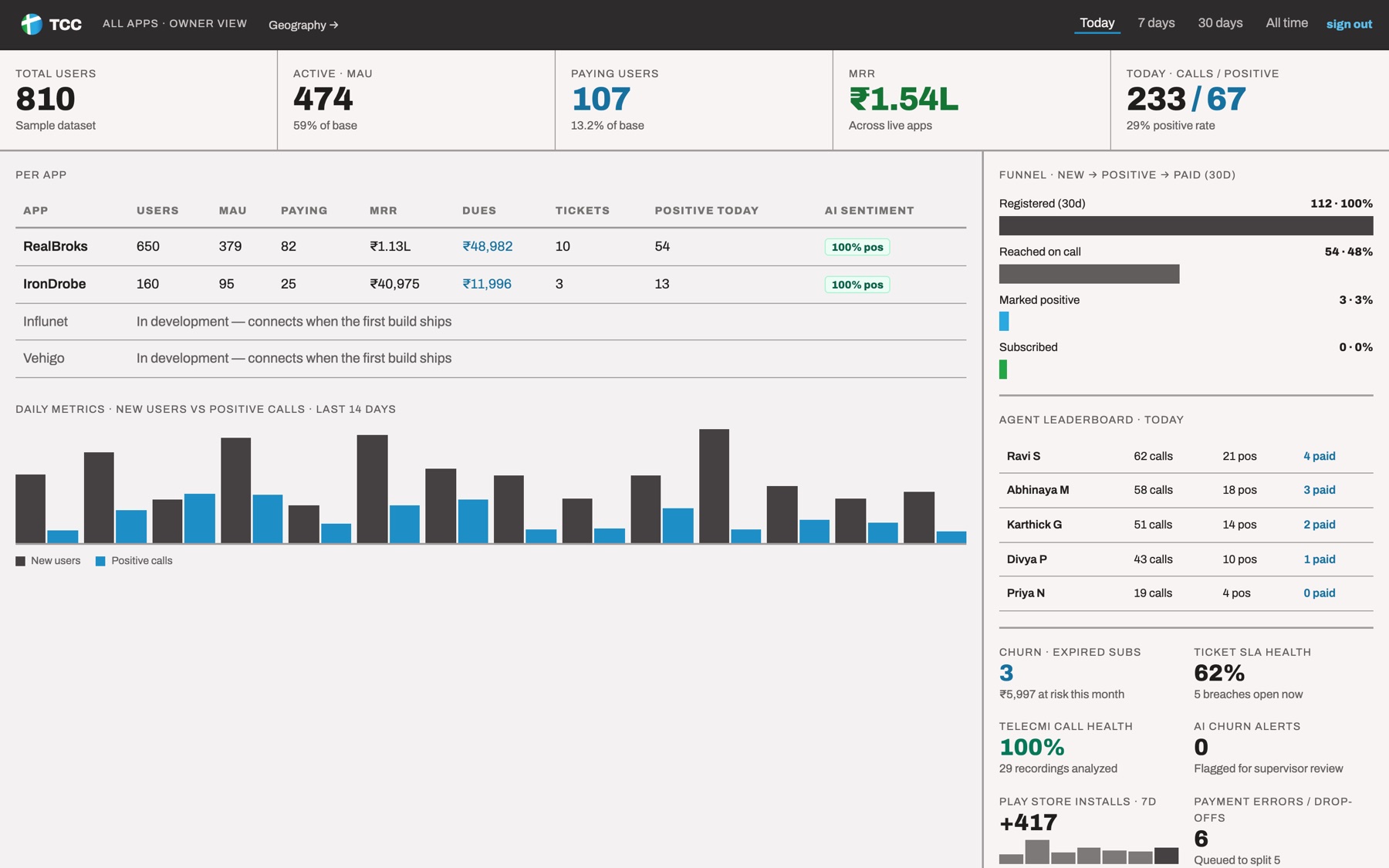
TCC pulls them into one console with three role-based views. Agents get a focused 3-step call panel driven entirely by keyboard shortcuts; supervisors manage team access, language and state allocation and an escalations inbox; owners get an all-apps dashboard with funnel, leaderboard, churn and an India map built with D3.
Operational data syncs live across browsers through Firestore, and calls are placed through TeleCMI with explicit safety modes before production dialling is switched on.
Tecstellar runs several consumer apps — RealBroks and IronDrobe live, Influnet and Vehigo on the way. Users, payments, tickets and follow-ups lived in separate dashboards, one per app, and the calling team worked from spreadsheets.
They needed one console where agents call the right customers, supervisors see who's falling behind and owners see the whole portfolio — without waiting for every app's database to be wired in first.
- 01
Sign in by role
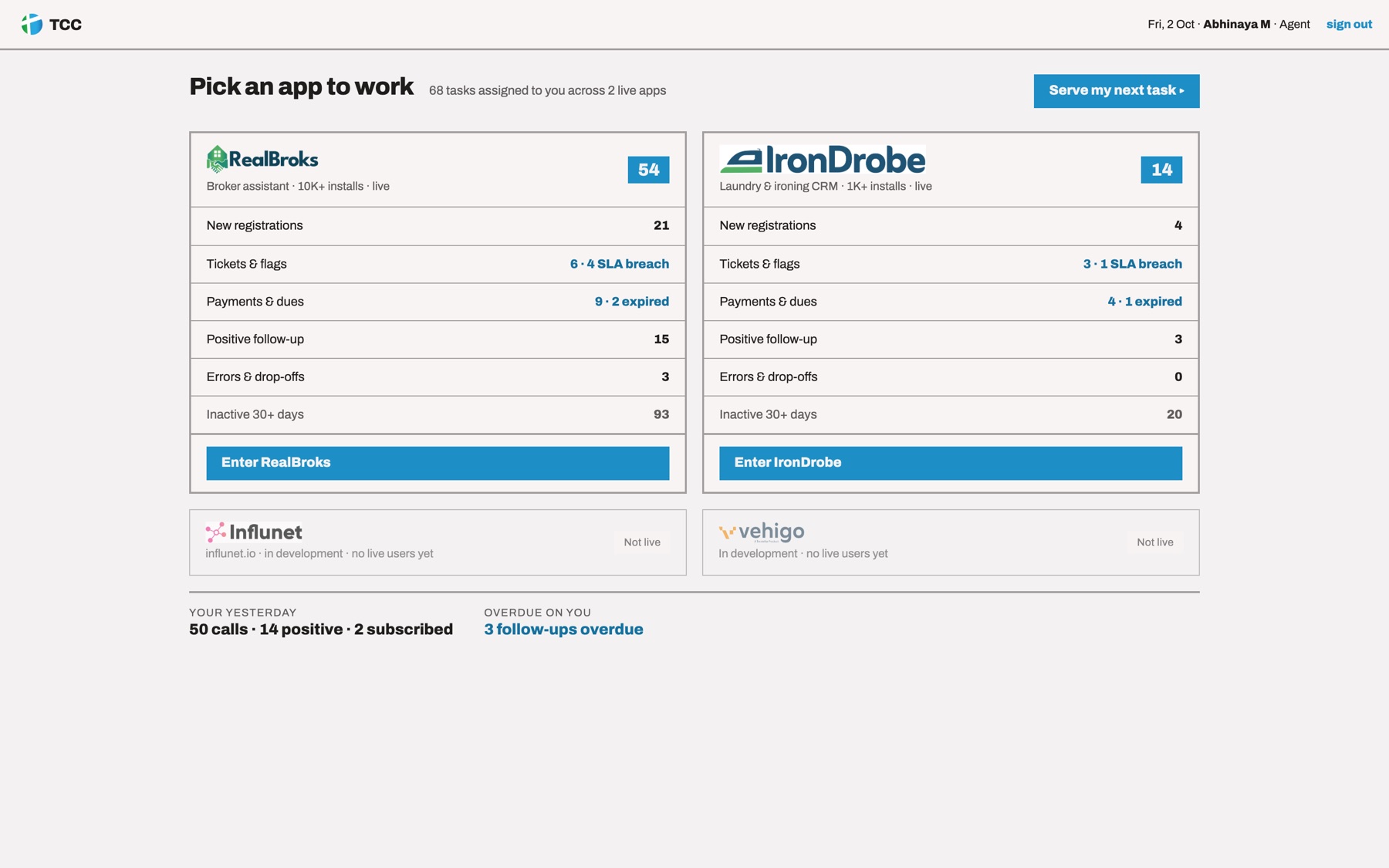
Agents land on today's queue, supervisors on their team, admins on the overview. Per-app permissions decide who can call, see recordings, payments or export.
- 02
Work the queue
A customer card shows why they're in the queue; the outcome form takes 1–5 for status, Q–I for outcome, Enter to save, S to skip and T to raise a ticket.
- 03
Call without losing context
The softphone is mounted for the whole session, so a call keeps going while the agent opens history; an ended call waits in the header until it's logged.
- 04
Escalate and allocate
Mid-call reroutes and escalations land in a live supervisor inbox, and the allocation view shows which languages and states nobody can reach.
- 05
Audit everything
Every sign-in, access change, approval, payment and export is written to a change log with exactly what changed.
Keyboard-first agent workspace
1–5 for status, Q–I for outcome, Enter to save, S to skip, T to raise a ticket — agents never reach for the mouse.
Queue-based access
Supervisors tick which queues each agent can see, with live coverage gaps and reachable-user counts per language and state.
Owner dashboard
Users, MRR, dues, funnel, agent leaderboard, churn and SLA health across every app.
Geography view
A D3 map of India with state boundaries and circles sized by user count.
- 01Runs on Firestore or fully offline on localStorage — chosen automatically
- 02Customer data layer split from TCC-owned data so the real app databases can be swapped in later
- 03Mid-call reroute and escalation wired to a live supervisor queue
- 04TeleCMI calling with documented dialling safety modes
Split what TCC owns from what the apps own
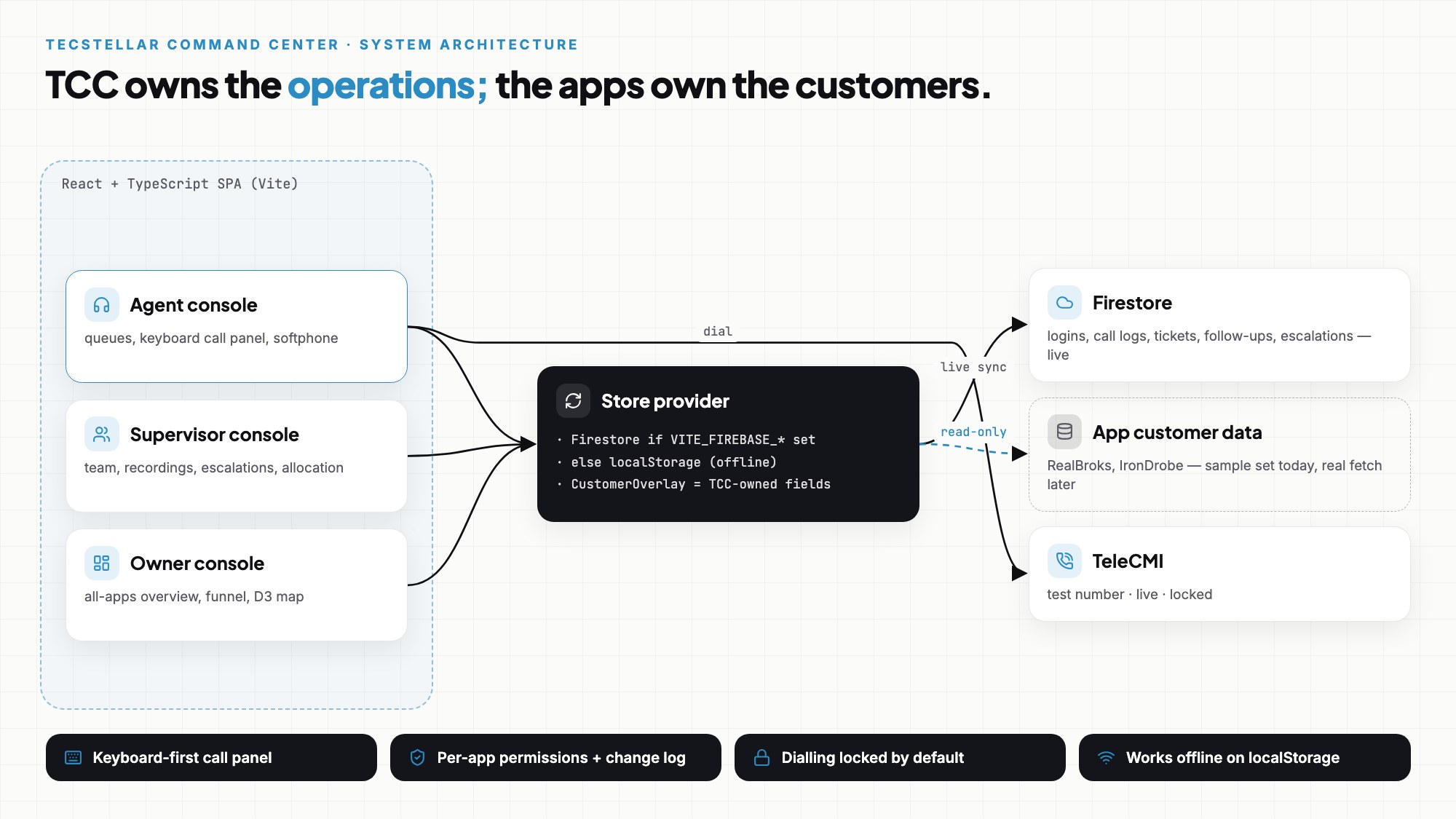
CustomerOverlay is exactly the slice TCC writes (calls, tickets, follow-ups). Customer master data stays the apps'; swapping the sample set for a real fetch touches nothing else.
Two backends, chosen automatically
With Firebase configured, operational data syncs live across browsers; without it, everything runs in localStorage with zero setup — useful for demos and offline work.
Calling is locked until you mean it
Sample customers have random numbers, so dialling has three modes: route every call to a test number, dial live, or stay locked with a visible banner.
Keyboard over mouse
Agents make hundreds of calls a day. Every outcome has a shortcut, so the hands stay on the keyboard between calls.
- →Connect customer master data to the real RealBroks and IronDrobe databases.
- →Move sign-in to server-side accounts (today it's a demo where only the username is checked).
- →Bring Influnet and Vehigo onto the console as they ship.
- →Enterprise TeleCMI features from the spec: recordings at scale and per-agent lines.
Want something like this?
I can build one for you.
Tell me what you have in mind — I'll reply with questions, a plan and a quote.