Amretri Healthcare
An in-browser lead assistant and a Google Sheets backend — no servers to run
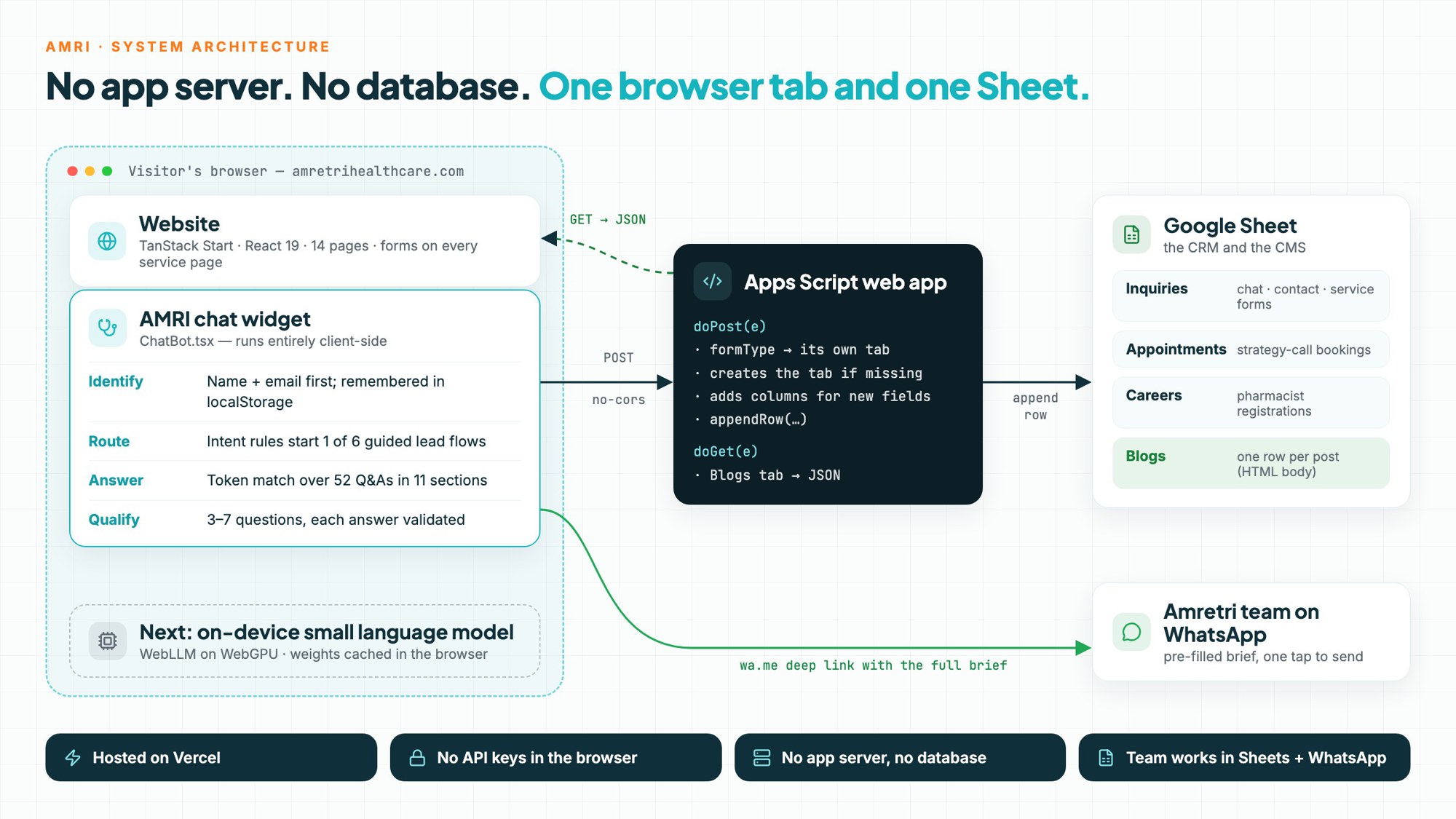
A 14-page website for a hospital pharmacy operator, with AMRI — a chat assistant that qualifies leads entirely in the visitor's browser — and a backend made of one Google Sheet and one Apps Script instead of a server and database.
Amretri Healthcare runs hospital pharmacies, supplies pharmacists and buys medicines in bulk for hospitals across India, and has done since 2009. Their buyers are hospital owners and administrators, and the sales team needs a few hard facts — hospital, city, beds, monthly pharmacy sales — before a call is worth making.
I designed and built the whole thing: a 14-page TanStack Start site (home, about, six service pages, pharmacist registration, blog, contact and legal pages), AMRI, the chat assistant on the homepage, and a backend that is nothing more than a Google Sheet and one Apps Script web app.
The constraint shaped every decision: a services company with no engineers on staff. Whatever I shipped had to cost close to nothing to run, and the team had to be able to work it from tools they already use — Google Sheets and WhatsApp.
Hospital buyers don't fill in long forms. They ask specific questions — “can you take over my pharmacy?”, “I need two night-shift pharmacists” — and expect an answer straight away.
The usual fix is a hosted chatbot, a backend, a database and an LLM bill. For a team with nobody to maintain it, that is a monthly cost and a system that slowly breaks.
So the brief became: answer the common questions instantly, turn intent into a qualified lead, and put every lead where the team already works — without anything to host.
- 01
Identify
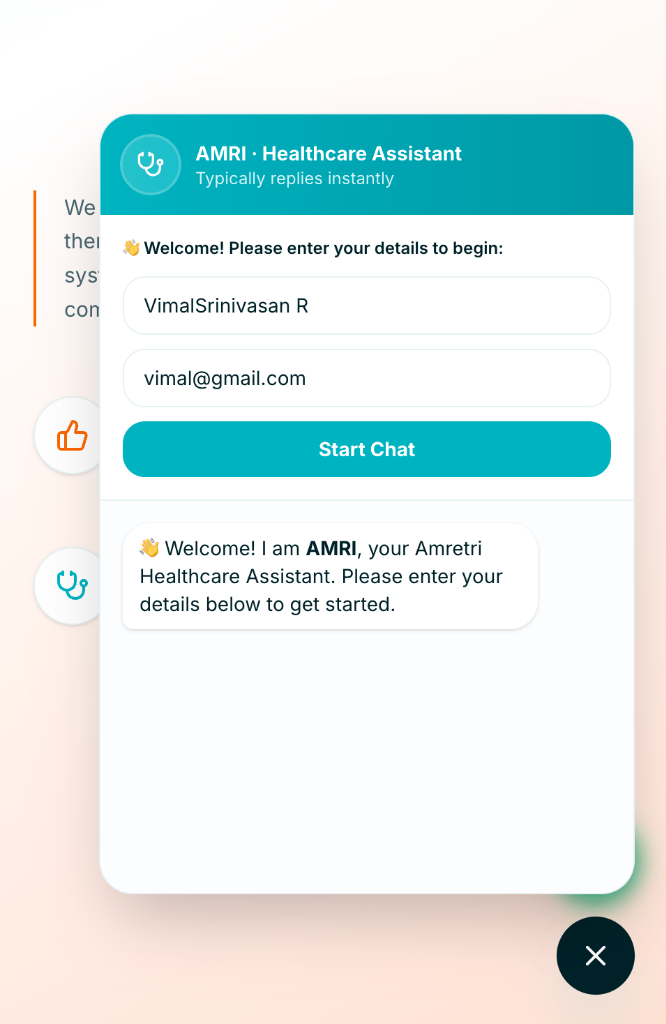
Before the first message AMRI asks for a name and email. The visitor is remembered in localStorage, and the contact is posted to the sheet as an Inquiries row.
- 02
Route
Every message hits intent rules first. Phrases about takeovers, staffing, purchase rates, setups, licences or a callback start the matching lead flow.
- 03
Answer
Everything else is token-matched against 52 reviewed Q&As in 11 service sections, with a confidence threshold. Below it, AMRI offers the menu or a human instead of guessing.
- 04
Qualify
Each flow asks 3–7 questions one at a time and validates the answer — contacts need 8+ digits or an @, and a bare “yes” is rejected. FAQ questions mid-flow are answered without losing the place.
- 05
Hand off
The completed brief becomes a pre-filled WhatsApp message to the Amretri team — one tap from the visitor.
AMRI chat assistant
Identifies the visitor, answers from a 52-question knowledge base and runs six guided lead flows — all client-side, with no model or API call per message.
Google Sheets as the CRM
The chat's welcome step and every site form land as rows: one tab per form type, created on first use, with new columns added automatically.
A blog with no CMS
Posts are rows (title, category, date, read time, author, HTML body). The blog fetches them at runtime, so publishing needs no redeploy; three built-in posts render if the sheet is unreachable.
WhatsApp hand-off
Finished intakes become a pre-filled wa.me message, and a WhatsApp button floats right above the chat launcher.
Safety-aware answers
Answers about licences and medico-legal topics automatically carry a note that final regulatory decisions need a qualified professional.
SEO groundwork
Per-page titles and descriptions, canonical URLs, a sitemap, and schema.org MedicalBusiness and FAQPage data on the homepage.
Rules before models
Buyers ask a narrow set of questions whose answers carry commercial and compliance weight. A rule engine gives the same reviewed answer every time, instantly and for free — and it's the right first layer even once a model is added.
A spreadsheet instead of a server
One Apps Script replaces the API and the database. doPost routes each form to its own tab and grows columns for new fields, so adding a form needs no backend change. doGet serves the blog.
Meet the team where it works
Leads arrive as sheet rows and WhatsApp messages, not in a dashboard nobody opens. There was nothing new for the team to learn.
Trade-offs, stated plainly
Apps Script redirects break CORS for JSON posts, so forms send with mode: 'no-cors' and confirm optimistically. The web-app URL is public by design, so spam filtering in the script is the next hardening step.
- →An on-device small language model (WebLLM on WebGPU) to phrase answers and handle questions the rules miss — weights cached in the browser, still no server or API key.
- →Semantic search over the knowledge base with in-browser embeddings, replacing token overlap.
- →Log completed intake briefs to the sheet as well as WhatsApp, so every qualified lead is on record.
- →Spam protection on the Apps Script endpoint (honeypot field and rate limiting).
Want something like this?
I can build one for you.
Tell me what you have in mind — I'll reply with questions, a plan and a quote.